Buy, sell and keep the books — locally or by import.
One system for Ethiopian traders: buying from local suppliers or abroad, stock in every warehouse and shop, sales and the till, and the books, kept to Ethiopian tax rules.
- Ethiopian calendar and fiscal year
- VAT and withholding from dated tax tables
- The till keeps selling offline
Ethiopian tax rules
VAT, withholding, PAYE and pension from dated tables.
E-invoicing ready
Connects through an accredited provider.
IFRS or IFRS for SMEs
The reporting framework is chosen per company.
Ethiopian calendar
Ethiopian months beside Gregorian dates.
One system, one set of books
Each part records its own work into the same stock and accounts, so a figure is entered once.
Procurement
Buy from local suppliers with approvals that fit your rules.
- Orders, receipts and supplier bills
- VAT and withholding worked out for you
- Pay in full or in parts
Connects: Feeds stock and payables
Import and export
Follow each import from order to warehouse, with every cost counted.
- Foreign payments at the bank’s rate
- Shipments, customs and clearing
- Landed cost on every unit
Connects: Feeds stock cost and the cash book
Inventory
Stock in every warehouse and shop, valued at what it really cost.
- Transfers, counts and reorder levels
- Lots, expiry dates and serial numbers
- Stock value on any day
Connects: Feeds cost of sales
Sales and point of sale
From quotation to invoice, and a till that keeps selling offline.
- Credit limits and part payments
- Returns and credit notes
- Coupons and offline sales
Connects: Feeds receivables and VAT
Finance and accounting
Receivables, payables, bank and the ledger, filled in by every module.
- Bank reconciliation
- Foreign currency with dated rates
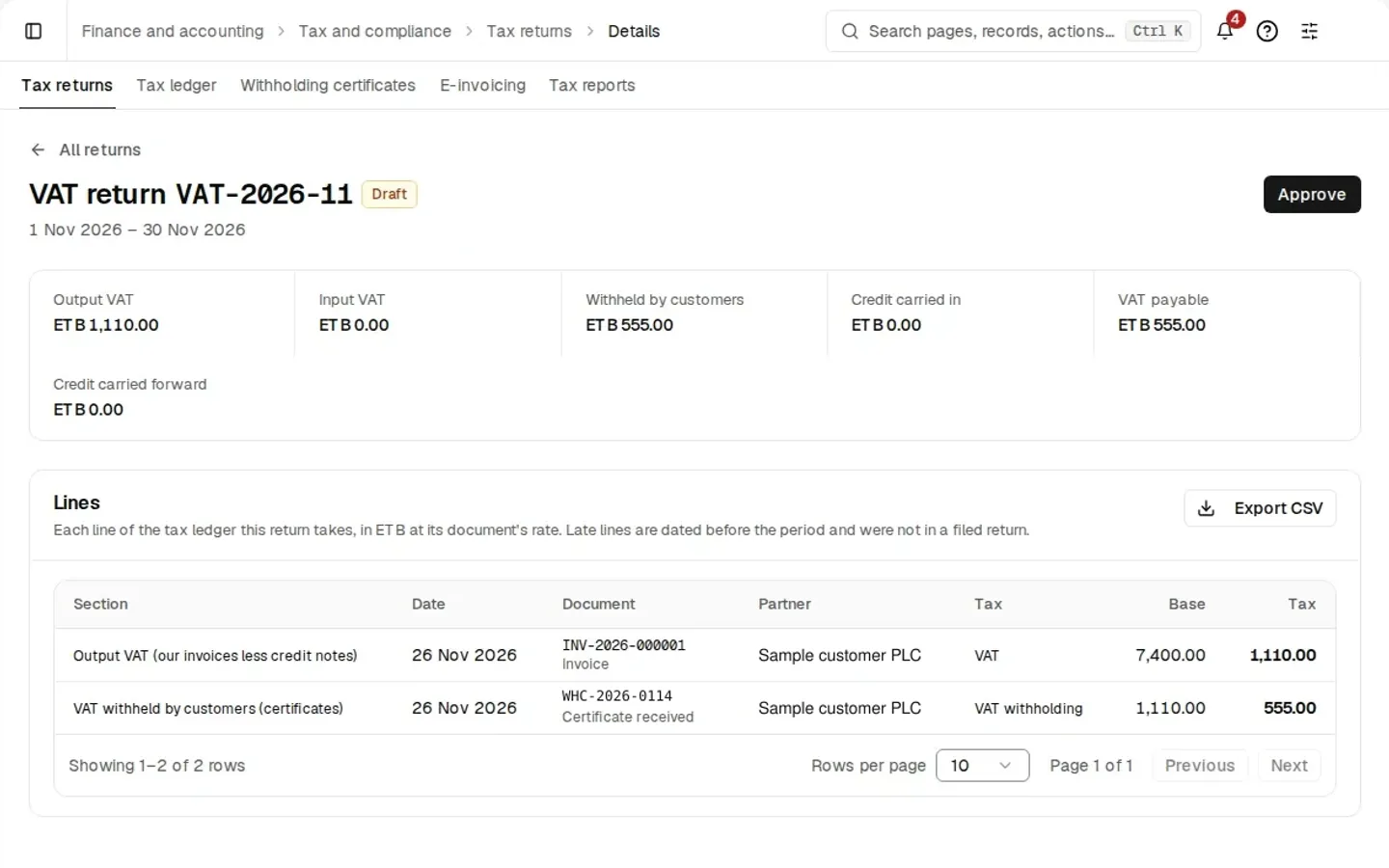
- VAT returns and withholding certificates
Connects: Ties every module to the books
HR and payroll
Attendance, leave and payroll with PAYE and pension.
- Attendance from fingerprint devices
- Leave approved by department
- Payslips and declarations
Connects: Feeds salary costs
Rentals
Equipment, vehicles and property, billed on schedule.
- Reservations and contracts
- Deposits and meter readings
- Recurring billing
Connects: Feeds receivables
Reports and dashboards
A dashboard for each role, and reports you can save and schedule.
- Filter, group and compare
- Excel, PDF and CSV
- Open any figure to see its documents
Connects: Reads from every module
From order to books
The same few steps whether you buy down the road or overseas. Figures below are made-up examples.
Step 1 of 5: Order
Raise a purchase order and get it approved.
Example: PO-0012
Step 2 of 5: Receive
Count the goods into the warehouse or shop.
Example: 120 pieces
Step 3 of 5: Supplier invoice
Record the bill; VAT and withholding are worked out.
Example: ETB 46,000 + VAT
Step 4 of 5: Pay
Pay in full or in parts and match it with the bank.
Example: Two payments
Step 5 of 5: Sell
Sell from stock by invoice or at the till.
Example: INV-0108
Kept to Ethiopian rules
Rates and calendars live in settings with effective dates, so a change in the law is a new entry, not a new release.
These rules apply as set up in your company’s settings. This is not a certification: your accountant confirms the rates for your company.
- VAT and withholding
- Rates come from a dated tax table that your accountant confirms.
- E-invoicing
- Ready to connect through an accredited provider.
- Ethiopian fiscal year
- Hamle to Sene, with Ethiopian-month periods.
- Records kept
- Financial records are never deleted, and every change is in the audit trail.
Security built in
Everyone signs in with their own account and sees only what their role allows.
Two-step sign-in
A code from an authenticator app after the password, required per role if you wish.
Audit trail
Who changed what and when, with the values before and after.
Roles and approvals
Menus and actions follow each person’s role; approvals can need a second person.
Sign-in protection
Growing waits after wrong passwords and sign-out after inactivity.
See the business as it stands
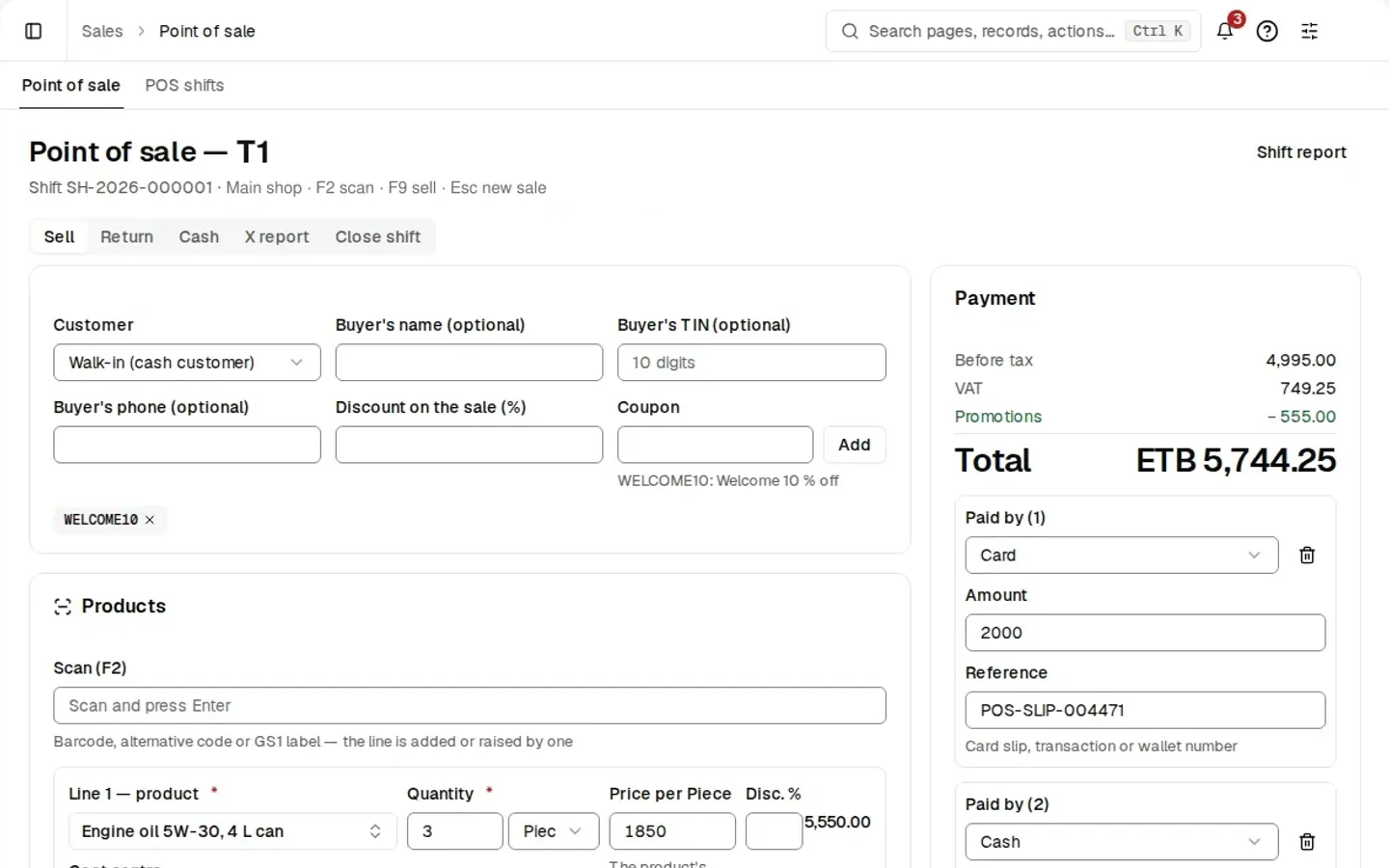
Screens of IEMS ERP with sample data. Every figure opens the documents behind it.
A till sale with a coupon, VAT and two ways to pay.
Questions we are asked
Who is IEMS ERP for?
Businesses that buy, import, hold stock and sell. Modules you do not need can be switched off.
Does it follow Ethiopian tax rules?
Yes. Rates come from dated tables your accountant confirms, and the Ethiopian fiscal year is built in.
Can it send e-invoices?
It connects through an accredited provider. Until your connection is approved, nothing is sent.
Does the till work without internet?
Yes. It keeps selling and sends the sales when the connection is back.
How do we start?
Request a demo. We walk through your kind of orders, then help you set up and train your team.
Request a demo
Tell us about your business and we will arrange a walk-through.
Or contact us directly
- Jabir Oumer
- 0949794235
- oum.burs9mry@gmail.com
- Addis Ababa, Ethiopia